DriveSupply
DriveSupply™ V100 Powered OBD2 Car Diagnostic Scanner
DriveSupply™ V100 Powered OBD2 Car Diagnostic Scanner
Couldn't load pickup availability
Diagnose Check Engine Lights in Seconds — Save Thousands on Mechanic Fees.
No more guessing why your warning light is on or overpaying workshops just to clear a simple error code. The DriveSupply™ V100 OBD2 Diagnostic Scanner puts instant engine insight directly into your hands. Designed with plug-and-play simplicity, it reads, interprets, and erases engine trouble codes in seconds—giving you complete transparency over your vehicle’s health.
Operating on a battery-free setup, the V100 draws power directly from your vehicle’s OBD2 port (supporting up to 36V systems). Whether you are a daily commuter, road-tripper, or DIY auto enthusiast, keeping this lightweight tool in your glove box ensures you never get taken advantage of when engine warnings appear.
Key Features:
Read & Clear Engine Trouble Codes: Instantly scan for generic and manufacturer-specific Diagnostic Trouble Codes (DTCs), turn off the Check Engine Light (MIL), and reset monitors.
No Batteries Required: Plug-and-play design powers up automatically via your car's OBD2 interface—no charging, external cables, or dead internal batteries to worry about.
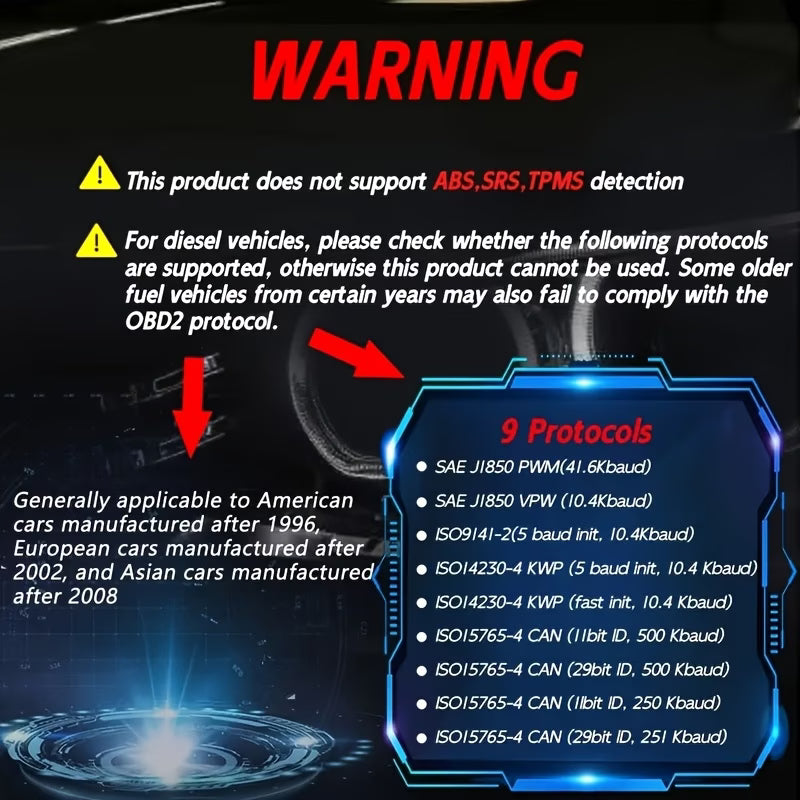
Universal 1996+ Vehicle Compatibility: Works on standard OBD2-compliant petrol and diesel cars, SUVs, and light commercial vehicles (12V–36V system support).
Built-in DTC Definition Library: Shows exact code definitions directly on the digital display screen so you know precisely what the problem is without searching online.
Freeze Frame & Real-Time Data: View snapshots of engine conditions (speed, coolant temp, sensor states) recorded at the exact moment a fault occurred.
Compact & Rugged: Lightweight, pocket-sized construction designed to store easily in your glove box, door compartment, or tool bag.
How to Use:
-
Locate your vehicle’s 16-pin OBD2 port (usually under the dashboard on the driver's side).
-
Plug in the DriveSupply™ V100 with the ignition turned off.
-
Turn the key to the "ON" position (or press Push-to-Start without holding the brake).
-
Select Read Codes on the digital menu to diagnose issues, or Erase Codes to turn off the Check Engine Light.
Product Specifications:
Brand: DriveSupply™
Model: V100 OBD2 Diagnostic Tool
Power Source: Direct Vehicle OBD2 Interface (No internal battery required)
Operating Voltage: Up to 36V System Support
Connector: Standard 16-Pin OBDII Port
Display: Digital Backlit LCD Screen
Functions: Code Reading/Clearing, DTC Definition Lookup, Freeze Frame Data, Vehicle Info (VIN) Retrieval
Share